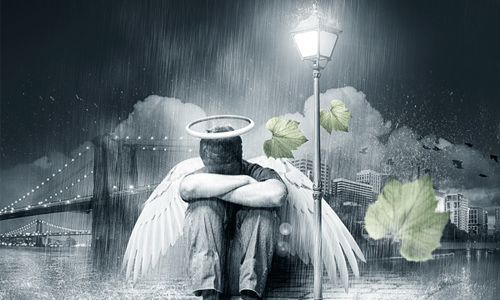
Photoshop is an impressive tool which is not only capable in manipulating images and creating photo effects, digital art, or typography, but it’s also a very useful tool for creating stunning poster designs. Poster Designs are basically used for movies, advertising campaigns, endorsement of various products and in many other artistic( graphic uses ). Poster Designs usually possess a distinct and unique approach by which to attract viewer attention.
In order for one to become an adept Pro in Photoshop they are required to devote time and patience as well as knowledge in order to truly master all that it has to offer, both the Artist and the layperson just starting out.
We have scoured the web and have gathered 20 of the best Photoshop tutorials which will help one learn and understand Photoshop better as well as improve and enhance ones Design skills.

How to Create a Retro Sci-Fi Computer Game Poster
Combine stock photos and design resources to create an awesome retro sci-fi themed game poster that takes inspiration from Atari games of the 80s. By mixing up bright and vibrant cosmic designs with old, distressed and grungey textures we’ll create a retro futuristic poster design for ‘Galactic Attack’.

Design a Vintage Style Swissair Travel Poster In Photoshop
Follow this step by step Photoshop tutorial to create a modern, clean, travel poster design for Swissair, and then learn how to transform into vintage poster design. We will use useful techniques related to patterns, visual organization with Photoshop guides, grunge texture to give a distressed look to the composition and adjustment layers for final retro touch.

Creating an Enticingly Beautiful Poster in Photoshop
In today’s digital tutorial I will be showing you how to make use of simple elements and combine them to turn it into a awesome looking poster. Everything in this tutorial is simple and easy to follow and you are guaranteed a unique outcome at the end of the day. With the unique outcome you can make use of poster printing services and get yourself a new wall decoration. Let’s not beat around the bush and get down to business. Check out the tutorial below.

Music Poster Design in Photoshop
In this tutorial, you will learn how to create a rocking Music Poster.

Gigposter Design: The New Sex
This tutorial requires NO drawing talent… so don’t trip folks. You will however need Adobe Photoshop 7.0 or higher and Illustrator CS2 or higher. My name’s Dave, and this is my first ever solo tutorial. I’m very unorthodox and direct… so forgive me if I lose you guys during any part of this.

Create sci-fi poster art
The traditional space movie poster is a highly polished but formulaic affair, featuring characters that loom out of the darkness, brooding intergalactic clouds, some gleaming chrome effects for the text, and then a smattering of lens flare to add a little realism.

How to create a Ying Yang Inspired Poster in Photoshop
Today we will create a poster inspired by the all-known symbol, Ying and Yang. We will try to create the same balance from the sign in a more elaborate illustration.

Create a Refreshing Beer Themed Poster Design in Photoshop
When you create a print advertisement, it’s important that all the elements of your composition are geared towards selling a product and promoting a brand. Today, we will demonstrate how to create a refreshing beer-themed poster design in Photoshop.

Design a Stylish Retro Game Boy Poster in Photoshop
This tutorial will walk you through the process of creating a vector Nintendo Gameboy in Illustrator and then using it to produce a cool retro poster in Photoshop.

How to create a mysterious poster design with 3d text
Today we will learn together how to realize a marvelous poster design using Photoshop and Illustrator. I’ll show you some useful IIlustrator tricks to create the 3D text effect of the piece, then we will switch to Photoshop to complete the scene with textures and color corrections. This tutorial is very simple to follow, so I suggest also to beginners to give a try.

Create a Grunge Snowboard Poster for the Winter Olympics
In this tutorial we’re going to put together a cool grungy poster design for the upcoming Vancouver Olympics. We’ll go over several basic Photoshop techniques and combine some basic image manipulation with some grunge text treatments to create some cool effects. This is an easy step-by-step tutorial that even Photoshop beginners should have no problem with.

How To Create Abstract hyperspace poster using Photoshop
Today we’ve got a really nice and simple tutorial demonstrating how to create hyperspace photo manipulation using Photoshop shapes, brushes, clouds filter and Blending modes. Layered PSD file included.

Create An Amazing Diamond Advertisement Poster in Photoshop
In this tutorial you will learn a few techniques that might be very useful for you and give you some great ideas when you start creating an advertisement. Before you go on and start the tutorial I would like to thank the photographers for their amazing stock images and for giving e permission to use the images:

Create Blood and Milk Typography Poster in Photoshop
Today we show you some Photoshop techniques, how easy with few basics steps you can create awesome typography poster. With this technique you can create interesting flayer for dace club or you can use in advertisements. To create this typography poster we will use some paint splashes, custom fonts and few stocks from Deviantart and of course your knowledge. Indeed in this tutorial will be used basic Photoshop tools, so do not be afraid and start to learn these techniques.

Create a Remarkable Poster with Decorative Elements
I am going to show you how to create various decorative elements including geometric shapes, halftones, ribbons, 3D stars, and 3D text in Illustrator and then merge, compose, enhance, and texturize them in Photoshop. The overarching goal of this tutorial is to learn how to use both of these powerful tools for their strengths for an unmatched workflow that takes advantage of both vector and raster graphics.

Design a Stylish Poster mixed with displacement effect in Photoshop CS5
In this tutorial, you’ll learn how to combine layer masks with custom brushes and adjustment layers to create eye catching poster mixed with displacement effect, using simple but effective techniques in Adobe Photoshop CS5. Layered PSD file included. Let’s get started!

Flying Person Poster Design With Photoshop
First off I opened the original image resulted from the shooting with the main purpose being isolating the character and the shadows on the floor. First thing I noticed was that his face was not expressive enough for what I had in mind.

iPhone Promotion Poster Design
iPhone Promotion Poster Design

How to create a dynamic nature poster in Photoshop
In this tutorial we will create a nature poster using stock images, vectors and brushes.

In order for one to become an adept Pro in Photoshop they are required to devote time and patience as well as knowledge in order to truly master all that it has to offer, both the Artist and the layperson just starting out.
We have scoured the web and have gathered 20 of the best Photoshop tutorials which will help one learn and understand Photoshop better as well as improve and enhance ones Design skills.
Creating a Spectrum Poster Design in Photoshop
In this tutorial, new WeGraphics contributor, Jonathan Wong walks you through how to create a Spectrum Poster design using Adobe Photoshop. So pull up a chair and join in as Jonathan takes us on a trip through his creative process.How to Create a Retro Sci-Fi Computer Game Poster
Combine stock photos and design resources to create an awesome retro sci-fi themed game poster that takes inspiration from Atari games of the 80s. By mixing up bright and vibrant cosmic designs with old, distressed and grungey textures we’ll create a retro futuristic poster design for ‘Galactic Attack’.Design a Vintage Style Swissair Travel Poster In Photoshop
Follow this step by step Photoshop tutorial to create a modern, clean, travel poster design for Swissair, and then learn how to transform into vintage poster design. We will use useful techniques related to patterns, visual organization with Photoshop guides, grunge texture to give a distressed look to the composition and adjustment layers for final retro touch.Creating an Enticingly Beautiful Poster in Photoshop
In today’s digital tutorial I will be showing you how to make use of simple elements and combine them to turn it into a awesome looking poster. Everything in this tutorial is simple and easy to follow and you are guaranteed a unique outcome at the end of the day. With the unique outcome you can make use of poster printing services and get yourself a new wall decoration. Let’s not beat around the bush and get down to business. Check out the tutorial below.Music Poster Design in Photoshop
In this tutorial, you will learn how to create a rocking Music Poster.Gigposter Design: The New Sex
This tutorial requires NO drawing talent… so don’t trip folks. You will however need Adobe Photoshop 7.0 or higher and Illustrator CS2 or higher. My name’s Dave, and this is my first ever solo tutorial. I’m very unorthodox and direct… so forgive me if I lose you guys during any part of this.Create sci-fi poster art
The traditional space movie poster is a highly polished but formulaic affair, featuring characters that loom out of the darkness, brooding intergalactic clouds, some gleaming chrome effects for the text, and then a smattering of lens flare to add a little realism. How to create a Ying Yang Inspired Poster in Photoshop
Today we will create a poster inspired by the all-known symbol, Ying and Yang. We will try to create the same balance from the sign in a more elaborate illustration.Create a Refreshing Beer Themed Poster Design in Photoshop
When you create a print advertisement, it’s important that all the elements of your composition are geared towards selling a product and promoting a brand. Today, we will demonstrate how to create a refreshing beer-themed poster design in Photoshop.Design a Stylish Retro Game Boy Poster in Photoshop
This tutorial will walk you through the process of creating a vector Nintendo Gameboy in Illustrator and then using it to produce a cool retro poster in Photoshop.How to create a mysterious poster design with 3d text
Today we will learn together how to realize a marvelous poster design using Photoshop and Illustrator. I’ll show you some useful IIlustrator tricks to create the 3D text effect of the piece, then we will switch to Photoshop to complete the scene with textures and color corrections. This tutorial is very simple to follow, so I suggest also to beginners to give a try.Create a Grunge Snowboard Poster for the Winter Olympics
In this tutorial we’re going to put together a cool grungy poster design for the upcoming Vancouver Olympics. We’ll go over several basic Photoshop techniques and combine some basic image manipulation with some grunge text treatments to create some cool effects. This is an easy step-by-step tutorial that even Photoshop beginners should have no problem with.How To Create Abstract hyperspace poster using Photoshop
Today we’ve got a really nice and simple tutorial demonstrating how to create hyperspace photo manipulation using Photoshop shapes, brushes, clouds filter and Blending modes. Layered PSD file included.Create An Amazing Diamond Advertisement Poster in Photoshop
In this tutorial you will learn a few techniques that might be very useful for you and give you some great ideas when you start creating an advertisement. Before you go on and start the tutorial I would like to thank the photographers for their amazing stock images and for giving e permission to use the images:Create Blood and Milk Typography Poster in Photoshop
Today we show you some Photoshop techniques, how easy with few basics steps you can create awesome typography poster. With this technique you can create interesting flayer for dace club or you can use in advertisements. To create this typography poster we will use some paint splashes, custom fonts and few stocks from Deviantart and of course your knowledge. Indeed in this tutorial will be used basic Photoshop tools, so do not be afraid and start to learn these techniques.Create a Remarkable Poster with Decorative Elements
I am going to show you how to create various decorative elements including geometric shapes, halftones, ribbons, 3D stars, and 3D text in Illustrator and then merge, compose, enhance, and texturize them in Photoshop. The overarching goal of this tutorial is to learn how to use both of these powerful tools for their strengths for an unmatched workflow that takes advantage of both vector and raster graphics.Design a Stylish Poster mixed with displacement effect in Photoshop CS5
In this tutorial, you’ll learn how to combine layer masks with custom brushes and adjustment layers to create eye catching poster mixed with displacement effect, using simple but effective techniques in Adobe Photoshop CS5. Layered PSD file included. Let’s get started!Flying Person Poster Design With Photoshop
First off I opened the original image resulted from the shooting with the main purpose being isolating the character and the shadows on the floor. First thing I noticed was that his face was not expressive enough for what I had in mind.iPhone Promotion Poster Design
iPhone Promotion Poster DesignHow to create a dynamic nature poster in Photoshop
In this tutorial we will create a nature poster using stock images, vectors and brushes.