
Even though you may know CSS very well and for some tasks it would take a lot of time to complete and for this there are lots of tools available using which you can complete your projects quicker. Here are some list of tools, which will make your work easier. Don't forget we are here to help our design community which will grow to a newer heights.
An easy to use online web page compression tool. Speed up your website by compressing, merging and Gzipping your CSS and Javascript files.

SelectorGadget is an open source bookmarklet that makes CSS selector generation and discovery on complicated sites a breeze. Just drag the bookmarklet to your bookmark bar, then go to any page and press it. A box will open in the bottom right of the website. Click on a page element that you would like your selector to match (it will turn green). SelectorGadget will then generate a minimal CSS selector for that element, and will highlight (yellow) everything that is matched by the selector. Now click on a highlighted element to remove it from the selector (red), or click on an unhighlighted element to add it to the selector. Through this process of selection and rejection, SelectorGadget helps you come up with the perfect CSS selector for your needs.

LESS
LESS extends CSS with dynamic behavior such as variables, mixins, operations and functions. LESS runs on both the client-side (IE 6+, Webkit, Firefox) and server-side, with Node.js.

CSS Pivot
Add CSS styles to any website, and share the result with a short link. Invite others to submit improvements for your website.

jsFiddle
Nifty tool for editing & sharing HTML / CSS / JS snippets.

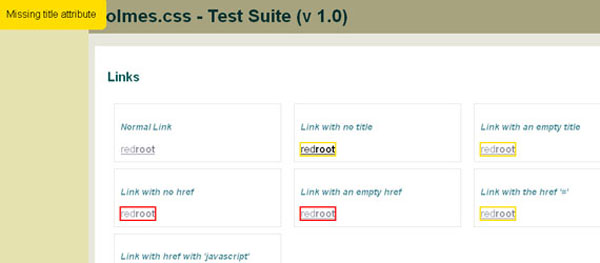
Holmes The CSS Markup Detective
Holmes is stand-alone diagnostic CSS stylesheet that can highlight potentially invalid, inaccessible or erroneous HTML(5) markup by adding one class.

CSSDesk – Online CSS Sandbox
CSSDesk is a online HTML/CSS sandbox. Experiment with CSS, see the results live, and share your code with others.

SlickMap CSS
SlickMap CSS is a simple stylesheet for displaying finished site maps directly from HTML unordered list navigation. It’s suitable for most web sites – accommodating up to three levels of page navigation and additional utility links – and can easily be customized to meet your own individual needs, branding, or style preferences.

CSS LINT
CSS Lint is a tool to help point out problems with your CSS code. It does basic syntax checking as well as applying a set of rules to the code that look for problematic patterns or signs of inefficiency. The rules are all pluggable, so you can easily write your own or omit ones you don’t want.

CSS Easing Animation Tool
Ceaser is an interactive CSS easing animation tool. It lets you build any kind of ease you want, and comes with many of the Penner Easing Equations.

CSS3 Generator
CSS3 generator will allow you to create virtually every CSS3 feature : gradients, shadows, box radius, font-face, transitions, animations. But, unfortunately, in spite of its great usefulness it has one big problem since all the popular CSS3 properties have multiple browser-specific implementations.

Minify and Gzip compress CSS & Javascript in a single click
An easy to use online web page compression tool. Speed up your website by compressing, merging and Gzipping your CSS and Javascript files.
SelectorGadget: point and click CSS selectors
SelectorGadget is an open source bookmarklet that makes CSS selector generation and discovery on complicated sites a breeze. Just drag the bookmarklet to your bookmark bar, then go to any page and press it. A box will open in the bottom right of the website. Click on a page element that you would like your selector to match (it will turn green). SelectorGadget will then generate a minimal CSS selector for that element, and will highlight (yellow) everything that is matched by the selector. Now click on a highlighted element to remove it from the selector (red), or click on an unhighlighted element to add it to the selector. Through this process of selection and rejection, SelectorGadget helps you come up with the perfect CSS selector for your needs.
LESS
LESS extends CSS with dynamic behavior such as variables, mixins, operations and functions. LESS runs on both the client-side (IE 6+, Webkit, Firefox) and server-side, with Node.js. CSS Pivot
Add CSS styles to any website, and share the result with a short link. Invite others to submit improvements for your website.jsFiddle
Nifty tool for editing & sharing HTML / CSS / JS snippets.Holmes The CSS Markup Detective
Holmes is stand-alone diagnostic CSS stylesheet that can highlight potentially invalid, inaccessible or erroneous HTML(5) markup by adding one class.WebPutty
With WebPutty, you get an in-browser, feature-rich, syntax-highlighting CSS editor. You can see your changes instantly with the side-by-side preview pane, so there’s no need for the traditional back-and-forth between your editor and refreshing a browser to see your changes. The editor is your browser…and the preview’s built-in! Best of all, the editor and the preview pane work together, so that when you click on a CSS selector, all the elements matching that selector are instantly highlighted in the preview pane.CSSDesk – Online CSS Sandbox
CSSDesk is a online HTML/CSS sandbox. Experiment with CSS, see the results live, and share your code with others.SlickMap CSS
SlickMap CSS is a simple stylesheet for displaying finished site maps directly from HTML unordered list navigation. It’s suitable for most web sites – accommodating up to three levels of page navigation and additional utility links – and can easily be customized to meet your own individual needs, branding, or style preferences.CSS LINT
CSS Lint is a tool to help point out problems with your CSS code. It does basic syntax checking as well as applying a set of rules to the code that look for problematic patterns or signs of inefficiency. The rules are all pluggable, so you can easily write your own or omit ones you don’t want.CSS Easing Animation Tool
Ceaser is an interactive CSS easing animation tool. It lets you build any kind of ease you want, and comes with many of the Penner Easing Equations.CSS3 Generator
CSS3 generator will allow you to create virtually every CSS3 feature : gradients, shadows, box radius, font-face, transitions, animations. But, unfortunately, in spite of its great usefulness it has one big problem since all the popular CSS3 properties have multiple browser-specific implementations.


